Saturday, February 11, 2012
HP HDMI to VGA adapter


Thursday, February 09, 2012
Built-in mobile router

Tuesday, February 07, 2012
Wi-tribe signal testing - Coffee Bean & Tea Leaf Residences
I'm getting 2/3-3/3 signal bars at the couch at the right side upon entering the place, and I'm still getting my subscribed speed.
sent using Gmail on a Motorola Xoom
Friday, February 03, 2012
Wi-tribe Signal Testing continues
Going on to my 2nd month with the Wi-tribe Mobile Router, there's only been a few places where I don't get a signal or a very weak signal...one of these places is Rockwell....Wi-tribe is totally useless inside Powerplant Mall, heck even my Sun cellular phone becomes a useless brick inside the mall.
At Starbucks in the Block stores still in Rockwell, the signal was very weak, as in only 1 signal LED was lighting up and though it still gave me consistent fast speeds, the signal was erratic.
Another place that has a weak to no signal is inside Greenbelt 5 mall. But in the garden and outside the structure, signal and speed is great.
Another thing that I like with the service is even with a weak signal, speed isn't compromised. Unlike the usual USB modem sticks and cellular-based mifi devices, where signal downgrades to slower speeds when weak signal is encountered.
sent using Gmail on a Motorola Xoom
Monday, January 30, 2012
Wireless Mobile Internet
If your planning to get one, don't expect performance to be at par with wired (DSL or Cable) internet. So don't expect to use it for your "torrenting" needs.
Wireless Mobile Internet was designed for mobile computing. That's why I believe that dreaming for a fast mobile wireless speed is rubbish. What's the point of aiming for a 20Mbps speed, when most would just used it on their cellphones, browsing or updating their social networking status.
It's the businesses that will benefit fast wireless internet. Unfortunately, most of us equate fast wireless internet to an easy fix of downloading torrents. And if you don't know the factors that can affect connection speeds on a wireless connection, then you better just shut up and subscribe to a wired connection.
sent using Gmail on a Motorola Xoom
Sunday, January 22, 2012
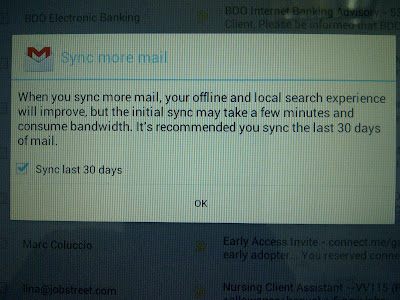
Offline Gmail for Ice Cream Sandwich
Friday, January 20, 2012
2 days of Ice Cream Sandwich
So far so good! Noticed a significant increase in responsiveness to touch, taps and launching apps. The teal highlights and new color palette sure is a welcome sight. And of course, the Roboto font gives more detail and better reading environment.
sent using Gmail on a Motorola Xoom
Wednesday, January 18, 2012
What's New in Ice Cream Sandwich part 1

Motorola Xoom Ice Cream Sandwich Update


Expecting that this is really ICS, I kept on check for any updates over the weekend (although I'm not part of the private beta testers), hoping to catch an update. No news either was being put out on when the real update will come out. Early this afternoon, I was wondering why my internet connection was a bit slow, since browsing bored me, I played around the Xoom and when I got to the System Update part of the settings, lo and behold, the device has downloaded most of the update and is in the verge of the reboot, though nothing in the download page says anything about ICS or what the update is all about.
After the install and reboot, the Roboto font greeted me in the installation proper, this confirmed my nerdgasm and a new splash sreen was flashing to my eyes. After it, my Motorola Xoom was new again! With Ice Cream Sandwich!!!
Progress Bar in BlackBerry Messaging app
I don't know if this has been here before, but I just found out while sending an email, you can highlight the message and a progress bar will hover giving you information as to how much was uploaded already. Nifty trick!
Sent from my BlackBerry® wireless handheld
Sent from my BlackBerry® wireless handheld
Send & Receive SMS from your Android Phone using your PC
Here are 3 applications (solutions) that I've used, which you might find useful when you're in the office or at home.


1.) Mightytxt
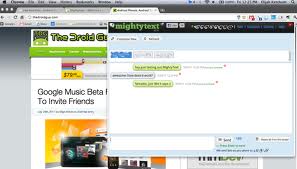
This one I've used the longest. It started as Texty and eventually evolved into Mightytxt. Install the app on your phone, then a counterpart extension is available for Chrome, which means you can use it in both Mac, Windows & Linux environments. It's been very accurate but a little slow to send sms. I don't know if you can call it an advantage, because even if your phone is not connected to the same wireless network, notifications will arrive/pop up on your desktop. So those who are on unlimited data plans, even if your phone is in the office, and your in the house, you can still get your messages (or until the battery lasts). So, if you're asking why I still have the two other apps below? Well, I want to get alerts on my Android tablet as well, which means, even when I'm on the road, with 2 phones and a tablet, it would be better if I don't have to bring out every gadget just to check my sms.
Which brought me to....
2.) MySMS

You also install an app on the phone. There's a Chrome app (not an extension) counterpart, but it's just an HTML5 site, which means, any device that has an HTML5 compatible browser (which is almost every browser out there)...which also means, I can use it on my non-Android tablet (BlackBerry Playbook), because Android tablets (Honeycomb & Ice Cream Sandwich) have their own app. Just like mightTxt your Android smartphone doesn't have to be in the same network for it to work, as long as the phone has data connection (wifi or data plan), it will work.
And the last app that I'm trying out is....
3.) Airdroid

This one needs to have your phone on the same wireless network as the device you're going to use to access the phone. And no counterpart application is needed to be on the accessing device (e.g. tablet, pc). Because once the phone app has been activated, it will give you an IP address and a dynamic password which you'll type on any web browser, input the password, and you're connected to your phone.
It's going to be a bit tricky because, you can use the mobile router function of the smartphone to link your accessing device (tablet) with the phone, but this will also increase the draining of the battery of the smartphone. But then again, it's another option right? Hope this helps.

The Roboto Font


Sunday, January 15, 2012
mySMS
If you have a wifi only Android tablet & you also own an Android phone w/ data plan, you can send & receive text messages on the tablet with this application. Just install the app in both devices and off you go typing on your tablet.
sent using Gmail on a Motorola Xoom
Saturday, January 14, 2012
Samsung Galaxy Tab 7.7 plus

I guess this is the real next generation Galaxy Tab. It's 7 inches, runs on Android and....it's a phone!
Handled one tonight and this tablet is thin and light. Very easy to lug around and since it's loaded with Honeycomb (and the potential Ice Cream Sandwich upgrade), you can do more things with it than the iPad. What I'm skeptic though is the use of the virtual keyboard. On how small it will be. I guess Swype and TouchPal keyboards will shine on this device. But mostly people will just be using the Tab to consume media rather than to create one.
sent using Gmail on a Motorola Xoom
CES - Samsung's Smart Window - YouTube
CES - Samsung's Smart Window - YouTube: ""
now this is the future...it may be expensive now...but in 10yrs time...man! Wow!
'via Blog this'
now this is the future...it may be expensive now...but in 10yrs time...man! Wow!
'via Blog this'
Wednesday, January 11, 2012
Can't connect to a landline using Globe cellphone
Right now I can't connect to any landline in Metro Manila while I can connect to my Globelines phone in the house. It keeps on either, disconnecting me, or No Circuits Available. I can connect to other Globe mobile numbers though. What's going on with Globe?
sent using Gmail on a Motorola Xoom
Using your BlackBerry Smarphone as a remote control for the BlackBerry PlayBook on PlayBook OS 2 - YouTube
Using your BlackBerry Smarphone as a remote control for the BlackBerry PlayBook on PlayBook OS 2 - YouTube: ""
As I've said before, this Playbook OS2 will fill in my geek addiction for February especially it has this. The BlackBerry phone can act as a remote, keypad, trackpad, mouse for the Playbook.
As I've said before, this Playbook OS2 will fill in my geek addiction for February especially it has this. The BlackBerry phone can act as a remote, keypad, trackpad, mouse for the Playbook.
BlackBerry PlayBook OS 2 Native Email, Calendar & Contacts Demo! - YouTube
BlackBerry PlayBook OS 2 Native Email, Calendar & Contacts Demo! - YouTube: ""
Here's a preview of the upcoming Playbook OS2. It's a year delayed, but, according to RIM, is on time for the February release and will be available for free as a download for current Playbook owners and pre-installed to those who will buy the tablet come February.
Here's a preview of the upcoming Playbook OS2. It's a year delayed, but, according to RIM, is on time for the February release and will be available for free as a download for current Playbook owners and pre-installed to those who will buy the tablet come February.
The video features the native PIM applications on the Playbook. Note that this does not pass thru the Bridge app which means, it's accessible with or without a BlackBerry phone.
The Messaging app is a unified app where emails, status updates (twitter, linkedin) are found. It has also tabs to make composition of multiple emails rather easy. And as RIM is known for, the messaging app can hold both work and personal email at the same time.
'via Blog this'
'via Blog this'
Subscribe to:
Posts (Atom)