Wednesday, March 28, 2012

MetroTwit

MetroTwit is a new Twitter client that is designed with the Metro UI of Windows 8 in mind. It has a minimalistic design that will fit well with Windows 8. From the twitter clients that I had used, and still using, I've chosen TweetDeck to be my default app for tweeting. Thus I will be comparing MetroTwit with TweetDeck a lot.

MetroTwit is a promising twitter client unfortunately, it insisted on being a stand-alone app, in a world where it is becoming more of a browser-centric environment. Some one using a computer, would rather have one application running and have everything he/she wants within that application. This is why, a lot of programmers and developers are focusing their efforts to web-based applications. 

TweetDeck started out with an AIR based app, but soon decided to go web-based, this way, the app itself can run on more platforms and not limited to a single one. 

After using MetroTwit for an hour and a half, I went back to using TweetDeck. Not because I like TweetDeck (I'm trying to be objective here), but because, after leaving the desktop for a short while, when I got back, the application slowed down (response). Although Google Chrome would also slow down when there are lots of extensions are installed, but once all fired up, Google Chrome or Tweetdeck for that matter will run smoothly. 

In summary, MetroTwit can have some followers, but I'm very skeptic as to how long.


Thursday, March 22, 2012

My BlackBerry

If by the 29th (the date Globe will migrate my account from my old BlackBerry Max My Super Unli to the new iPhone Plan 1799 Unlisurf Combo) I cannot use my BlackBerry (BBM) on wifi, then it's really going to the shelf for my trusty QWERTY phone.

While in the mall earlier, I realized, that perhaps I will really be sticking it out with the iPhone as the primary phone on Globe and an Android smartphone on Smart until my contract expires on both. I still have a year on SUN and 2 years on Globe, which means a new phone every year from my providers (that is of course if I decide to stay, which I will perhaps because I want to hold on to my numbers).

I'm hoping that when my contract expires with Globe, a new iPhone #S is out to replace this one that I have now. And with Sun, if BlackBerry is still alive by then, and they've released new phones with BlackBerry 10  OS, with mobile hotspots feature, then I think it's the perfect time to switch back to the BlackBerry world.

sent using Gmail on a Motorola Xoom

Tuesday, March 20, 2012

Re-installing iOS apps

Done installing Flipboard, Zite, Twitter, Tweetdeck, Facebook, Intagram, Dropbox, Viber, Skype, Medscape....now waiting for ePocrates to finish updating....I wonder what else I've missed

sent using Gmail on a Motorola Xoom

Friday, March 09, 2012

3G or WiFi version on a tablet?

I'll always suggest get the WiFi version & just subscribe to an unlimited data plan on a Mobile Wireless Router (MiFi).

By doing so, you spend less on the device & data is not limited to one device. And if ever you decide to change environments (e.g. iOS to Android to BlackBerry), less hassle for you since the router is still the same.

sent using Gmail on a Motorola Xoom

Saturday, February 11, 2012

HP HDMI to VGA adapter

Finally got it! Will test it once I get home. Though I don't see any problems since Playbook owners are recommending this for a laptop-less business meetings and presentations.

Thursday, February 09, 2012

Built-in mobile router

1st time to read about this, but I'm impressed. I wonder what hardware they're using.

Tuesday, February 07, 2012

Wi-tribe signal testing - Coffee Bean & Tea Leaf Residences

I'm getting 2/3-3/3 signal bars at the couch at the right side upon entering the place, and I'm still getting my subscribed speed.

sent using Gmail on a Motorola Xoom

Friday, February 03, 2012

Wi-tribe Signal Testing continues

Going on to my 2nd month with the Wi-tribe Mobile Router, there's only been a few places where I don't get a signal or a very weak signal...one of these places is Rockwell....Wi-tribe is totally useless inside Powerplant Mall, heck even my Sun cellular phone becomes a useless brick inside the mall.

At Starbucks in the Block stores still in Rockwell, the signal was very weak, as in only 1 signal LED was lighting up and though it still gave me consistent fast speeds, the signal was erratic.

Another place that has a weak to no signal is inside Greenbelt 5 mall. But in the garden and outside the structure, signal  and speed is great.

Another thing that I like with the service is even with a weak signal, speed isn't compromised. Unlike the usual USB modem sticks and cellular-based mifi devices, where signal downgrades to slower speeds when weak signal is encountered.

sent using Gmail on a Motorola Xoom

Monday, January 30, 2012

Wireless Mobile Internet

If your planning to get one, don't expect performance to be at par with wired (DSL or Cable) internet. So don't expect to use it for your "torrenting" needs.

Wireless Mobile Internet was designed for mobile computing. That's why I believe that dreaming for a fast mobile wireless speed is rubbish. What's the point of aiming for a 20Mbps speed, when most would just used it on their cellphones, browsing or updating their social networking status.

It's the businesses that will benefit fast wireless internet. Unfortunately, most of us equate fast wireless internet to an easy fix of downloading torrents. And if you don't know the factors that can affect connection speeds on a wireless connection, then you better just shut up and subscribe to a wired connection.

sent using Gmail on a Motorola Xoom

Sunday, January 22, 2012

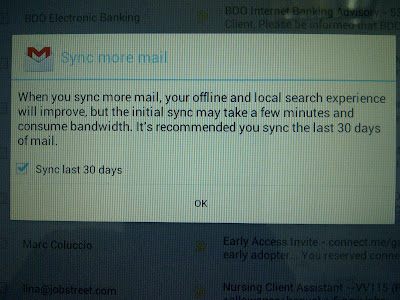
Offline Gmail for Ice Cream Sandwich

Don't know if it was present in Honeycomb, but I just noticed it after the upgrade. Sweet!

Friday, January 20, 2012

2 days of Ice Cream Sandwich

So far so good! Noticed a significant increase in responsiveness to touch, taps and launching apps. The teal highlights and new color palette sure is a welcome sight. And of course, the Roboto font gives more detail and better reading environment.

sent using Gmail on a Motorola Xoom

Wednesday, January 18, 2012

What's New in Ice Cream Sandwich part 1

The splash screen is different. It's not the fluctuating, hypnotic purple honeycomb anymore, now it's more like the yellow, red, orange, blue flakes blasting out of a windows logo (I don't know why but that's what I can think of). Of course the Roboto font which is very noticeable system wide. In honeycomb, to unlock a device, just drag the encircled padlock outside the bigger circle, now you can only drag the padlock to either the left, which will open the camera app right away, or to the right, which will totally unlock the device. In the notifications bar, instead of tapping the "x" to dismiss, now, you have to "flick" or slide the notification to dismiss. Also, the glowing blue of honeycomb has been replaced with a brighter teal and a more dynamic set of icons on the task bar.

Motorola Xoom Ice Cream Sandwich Update

I've been expecting this since ICS was announced. Last week, Motorola sent an email to Xoom Wifi owners that are members of the Xoom support forum that Motorola will conduct a "project" involving the device and it's owners. The project turned out to be private beta testers for the release build of Ice Cream Sandwich. The "project" was started at the end of the week, to span the whole weekend to test the build for any problems that users might encounter. This is a pretty quick test really.

Expecting that this is really ICS, I kept on check for any updates over the weekend (although I'm not part of the private beta testers), hoping to catch an update. No news either was being put out on when the real update will come out. Early this afternoon, I was wondering why my internet connection was a bit slow, since browsing bored me, I played around the Xoom and when I got to the System Update part of the settings, lo and behold, the device has downloaded most of the update and is in the verge of the reboot, though nothing in the download page says anything about ICS or what the update is all about.

After the install and reboot, the Roboto font greeted me in the installation proper, this confirmed my nerdgasm and a new splash sreen was flashing to my eyes. After it, my Motorola Xoom was new again! With Ice Cream Sandwich!!!

Progress Bar in BlackBerry Messaging app

I don't know if this has been here before, but I just found out while sending an email, you can highlight the message and a progress bar will hover giving you information as to how much was uploaded already. Nifty trick!
Sent from my BlackBerry® wireless handheld

Send & Receive SMS from your Android Phone using your PC

Here are 3 applications (solutions) that I've used, which you might find useful when you're in the office or at home.

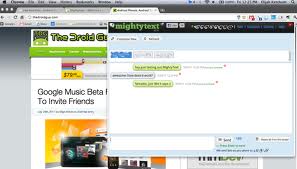
1.) Mightytxt


This one I've used the longest. It started as Texty and eventually evolved into Mightytxt. Install the app on your phone, then a counterpart extension is available for Chrome, which means you can use it in both Mac, Windows & Linux environments. It's been very accurate but a little slow to send sms. I don't know if you can call it an advantage, because even if your phone is not connected to the same wireless network, notifications will arrive/pop up on your desktop. So those who are on unlimited data plans, even if your phone is in the office, and your in the house, you can still get your messages (or until the battery lasts). So, if you're asking why I still have the two other apps below? Well, I want to get alerts on my Android tablet as well, which means, even when I'm on the road, with 2 phones and a tablet, it would be better if I don't have to bring out every gadget just to check my sms.

Which brought me to....
2.) MySMS

You also install an app on the phone. There's a Chrome app (not an extension) counterpart, but it's just an HTML5 site, which means, any device that has an HTML5 compatible browser (which is almost every browser out there)...which also means, I can use it on my non-Android tablet (BlackBerry Playbook), because Android tablets (Honeycomb & Ice Cream Sandwich) have their own app. Just like mightTxt your Android smartphone doesn't have to be in the same network for it to work, as long as the phone has data connection (wifi or data plan), it will work. 

And the last app that I'm trying out is....
3.) Airdroid

This one needs to have your phone on the same wireless network as the device you're going to use to access the phone. And no counterpart application is needed to be on the accessing device (e.g. tablet, pc). Because once the phone app has been activated, it will give you an IP address and a dynamic password which you'll type on any web browser, input the password, and you're connected to your phone. 

It's going to be a bit tricky because, you can use the mobile router function of the smartphone to link your accessing device (tablet) with the phone, but this will also increase the draining of the battery of the smartphone. But then again, it's another option right? Hope this helps.

Upgraded to Ice Cream Sandwich

Yup! My Motorola Xoom is now running Android 4.0.3! Wooohooo!

The Roboto Font

Change in font is confirming the "suspicion"! Damn, good to have a GED (Google Experience Device)

Restarting

After the "surprise" update. Waiting for the reboot! Still in nerdgasm!

Sunday, January 15, 2012

mySMS

If you have a wifi only Android tablet & you also own an Android phone w/ data plan, you can send & receive text messages on the tablet with this application. Just install the app in both devices and off you go typing on your tablet.

sent using Gmail on a Motorola Xoom

Saturday, January 14, 2012

Samsung Galaxy Tab 7.7 plus

I guess this is the real next generation Galaxy Tab. It's 7 inches, runs on Android and....it's a phone!

Handled one tonight and this tablet is thin and light. Very easy to lug around and since it's loaded with Honeycomb (and the potential Ice Cream Sandwich upgrade), you can do more things with it than the iPad. What I'm skeptic though is the use of the virtual keyboard. On how small it will be. I guess Swype and TouchPal keyboards will shine on this device. But mostly people will just be using the Tab to consume media rather than to create one.

sent using Gmail on a Motorola Xoom