Monday, September 26, 2011

My New BlackBerry Playbook

 
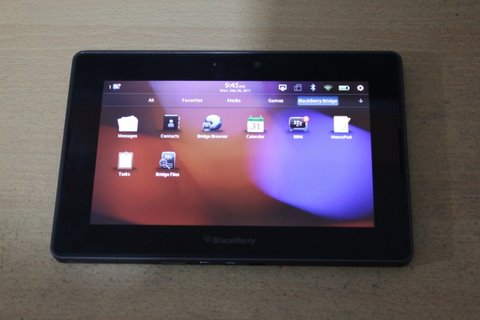
At last I got my BlackBerry Playbook last saturday and was so excited to use it, and "bridge" it with my BlackBerry Bold 9780.

I've been using a Motorola Xoom for a while now and I have no complaints about it even up to now. I love the size of the screen of the Motorola Xoom. Whenever I'm out, I have with me, the Motorola Xoom, the LG Optimus One where a SUN Cellular Postpaid line is hooked up to, and this is what I use to connect the Xoom to the internet using Android's Mobile Router feature or the wireless tethering function. And of course, my trusty messenger, the BlackBerry Bold 9780 which is using a Globe Postpaid SIM with BlackBerry Internet Service. 

I'm not saying that I am not getting enough from what I'm paying Globe Telecoms with my unlimited data of BlackBerry Internet Service (BIS), but with the BlackBerry Playbook, I mean, I can still do more. 

I love the Playbook for it's simplicity, this is what RIM is known for, they know how an "exclusive class" should look like. And one look at the Playbook will tell you right away of it's snooty-ness genre.
It's so plain and elegant that there are very few things that will break the continuous lines of the device. Ports at the bottom are the microHDMI, microUSB (which can be used for charging) and the propriatory port which is used with a dock. 
At the top there's the 3.5mm headphone jack (i would want it at the bottom just in case I use it with a car mount and no wires will be dangling all over the dashboard), the 4 flushed buttons (3 media buttons - volume up and down + the play/pause) and the power/standby button. And at the opposite side of the heasphone jack is the tiny hole for the microphone. 
On the sides of the screen are two speakers (stereo I think).
The screen is awesome, although small compared to the Motorola Xoom, but your eyes won't get strained while looking at it. One might think that the bezel is too think for the device, well, that's because those are touch-sensitive areas where "gestures" to control the device originates.
Originally there are 4 tabs for the applications: All, Favorites, Media and Games, but another tab is added, the BlackBerry Bridge tab, when the device is "paired" with a BlackBerry phone (OS5, OS6 and OS7 supported).
I'm very impressed at how almost immediate the notifications are. After hearing the alert from the phone, I check the Playbook and there it is, either the upper left corner is glowing (when you're on another application) or the notification icon appears. A bit of a warning though, Bridge will only give you alerts for BBM and emails messages, SMS and other application alerts doesn't happen on the Playbook.
The virtual keyboard is fun to use, but coming from the Motorola Xoom, I found it minuscule at first, but decided to do thumb-typing instead and everything now is a breeze.
One disappointment is the "selective" roll out of BlackBerry apps (the ones developed by RIM). It doesn't have the Podcasts and BlackBerry News app and I cannot download it from the App Store since it's not available in my region (PHILIPPINES).

Although some other disappointments are the lack of a native Twitter app (the one included is just a shortcut to the Twitter website), though a native Facebook app is included. Then there's the lack of instant messaging or video calling apps like Skype or GTalk. Not everyone has a BlackBerry Playbook to use the VideoCalling app. I have yet to test the AIM A/V app, hopefully it'll be my stopgap app until decent apps (if ever they come) are developed.
The Playbook is one multi-tasker if I might say, I opened up 5 tasks and still it works.

Here are pictures of my very new toy, a 16GB BlackBerry Playbook.

As you can see, the Xoom is humongous compared to the Playbook or the Playbook is minuscule compared to the Xoom.

Friday, September 23, 2011

SUN still tops Blackberry Plans in the Philippines


I'm a fairly young Blackberry user, having joined the Blackberry foray for just a couple of years.
My 1st Blackberry was a Curve 9520 their very 1st consumer oriented handheld and was reasonably priced. Before only the enterprise can afford a Blackberry. But with the market trends shifting, it was a good decision from RIM to "expand" their targets and include the pop consumers this time. And I guess they made the rgith choice not ignoring consumer demands.
I got the curve as a Globe prepaid kit, since I just want to try it out. It came with a free 1 month Blackberry Internet Service (BIS). And it that one month, I was hooked! Hooked I tell you! After that 1 month, I requested that the BIS on my plan be activated and from that day on, I've been using a Blackberry.
Problem is, it's a bit expensive. Then, it was P1200/month for the BIS alone, that's on top of my Monthly Service Fee (MSF). Then after a couple of months (I think) Globe brought it down to P999 a month and stayed in that area for years. Then just a couple of months ago, Globe brought that price to P599/month. Pretty aggressive marketing mind you.
Here in the Philippines, there are 3 networks that offer Blackberry Plans...Globe Telecom, Smart Communications and Sun Cellular. Everything was pretty the same until mid of this year when Sun offered the BEST Blackberry plan to date. One only has to pay, P999 a month, and that's it! P999 for the BIS, for unlimited intranetwork calls & texts, unlimited mobile internet. Unlike Globe's P599 a month but still doesn't include the charges for calls and SMS. Smart I s better than Globe's offering since it offers consumable plans, but still doesn't beat Sun's offering.
The only thing that's holding be on to Globe's network is my number, since number portability has not been applied here yet, and the coverage since Sun's coverage is still relatively concentrated within the Metropolis. Hopefully, the merger between Sun Cellular and Smart Communications push thru to help Sun get a ride on Smart's nationwide coverage.
sent using Gmail on a Motorola Xoom

Wednesday, September 14, 2011

Watch a Water Fountain Animate in Real Life


'via Blog this'

I am always fascinated with fountains, especially those "dancing" ones. But this fountains in Osaka, Japan is just amazing! It can control the water spray to make graphics like flower patterns, musical notes and even fonts.

Saturday, September 10, 2011

The Blogger app

Posting this using the Blogger android app. I don't know why i didn't do it before, the Market place didn't allow me to install this in any of my devices, kept on getting the "this device is incompatible with all of your devices" prompt. Then it dawned to me that I can install apps on my phone some other way, thus here it is.

Thursday, September 08, 2011

LG Optimus One P500 Gingerbread Update

I read online a couple of weeks ago that the Gingerbread update for the LG Optimus one will be rolling out soon. I decided to try out my luck tonight as I hook my Optimus One to my PC. Sure enough a roughly 117MB update was available. I didn't expect it to be Gingerbread though as not much chatter can be seen online. And after the update, I saw that the firmware version went down from V20G to V20D...so I rebooted the phone and to my surprise there were visual changes!

The notification bar is now black and the icons are green (i know i know, lots of Android phones had this even before Gingerbread, but hey...i said, it's new on the Optimus One) plus a location icon which was not included in the quick buttons in the notification bar buttons.

And pretty much Samsung's settings page, it's now colored (as compared to the previous' bland bi-tone layout). As for the apps, well, the notification app (the one that tells you if there's a new firmware) has disappeared while a download app has popped-out.

So far, those are the changes i've seen. Now, my LG Optimus One is now running Android 2.3.3

Thursday, September 01, 2011

Samsung announces Galaxy Tab 7.7 with Android 3.2 and a Super AMOLED Plus display | Android Central

Galaxy Tab 77
'via Blog this'

I am so into tablets nowadays...and then Samsung came out with this...OMG!!! It's a portable Honeycomb! Although I don't know how I'll react on it on a 7.7inch screen but I'm excited about the portability...I mean, the 7 inch market is really there...that's the right size!

Difficult Browsing using Chrome

I've been having difficulty browsing Google sites the past days. Then I restarted the router today...wham! Now I'm getting speedy refreshes and Google sites can now be access with ease.

The was supposed to be a "routine" troubleshoot. Yeah I know, but the stubborness in me was overwhelming logic as I didn't want to "disturb" my "downloads". :)
Sent from my BlackBerry® wireless handheld

Monday, August 29, 2011

:: Welcome to ApenUSA.com ::

slideshow_large
If only they had these when I was studying...although I want one now. Will come in handy during conferences...i wonder now where to get refills for the pen?

Friday, August 26, 2011

Mommy-berry

Today duting my kids' school celebration of Buwan ng Wika...she's just
one of the few people I saw (including kids) using BlackBerry phones.

Wednesday, August 24, 2011

Sony NEX-5N replaces NEX-5, adds 16.1 MP sensor, 25,600 max ISO, OLED viewfinder option (video) -- Engadget

i've always wanted to shoot professional looking pictures. I kept on convincing myself that it's just a matter of practice to get those kinds of wonderful photos.

The 1st thing to do is to get a decent camera, so I looked at those entry-level DSLRs...was excited to own one initially but it eventually wore off as it became affordable & lots of people are going into photography (not that I'm saying it's bad), it's just that i don't believe that everyone can become one...oh and they all looked so funky and ehm cheap hahahaha (sorry guys).

Then came the micro four-thirds camera...they's small yet they pack the same picture quality as their DSLR cousins. The one that attracted me was the NEX series from SONY. Well, they're very attractive! The body is tiny and dwarfed even more by the lenses. I handled one a couple of months back and it was gorgeous. Though no viewfinder, but the screen is awesome. I was really going to get it, until.

Until a friend of mine offered me his CANON EOS 550D at a very affordable price, less than a year old and was just used as a back up camera. I'm not the type of person who buys 2nd hand things, but with the price he's offering it, heck I couldn't resist.

Maybe, just maybe on the side note. It was a good thing that I took the camera. Even though I look like a dork, walking around the mall with it around my neck. It forced me to learn the basics of the camera controls and how it affects the shots. Maybe, it's a good start that I begin on a full-sized DSLR and eventually move to these micro four-thirds camera. These are just MAYBE's.

Tuesday, August 23, 2011

ICONIA SMART

If they will price this at the sub-P20k mark, I will definitely consider getting this as the replacement for my barely-year old LG Optimus One.

I like the looks, the form factor oh and of course, I'm already familiar with the OS.

Although the rumored "affordable" iPhone that is set to be announced this September is also a tempting thought.

ICONIA TAB W500

I'm interested with this. At this price point, it will attract a lot of buyers considering it's running a full windows 7 OS, and productivity apps which most people are used to.

BlackBerry's Channel - YouTube

My tablet experience

I've always wanted a tablet, a computer that I can bring around...in the house, while watching TV, something I can use to glance at what ever is new in the internet. A computer that I don't have to wait to boot, something that will give me instant gratification tech-wise. I guess the time that I was waiting for has come.

Though not yet fully satisfied, mainly due to limitations on the present set-up, like I want to use the tablet for my presentations, for my lectures, which I can't at the moment, not because the tablet is incapable if it, but because it's too difficult to connect to projectors thru VGA cable, the current "standards" on the displays.

But I am more satisfied than not with my tablet. Instead of firing up the desktop in the morning to read the news, now I can do it, even when I'm still in bed. As I eat breakfast, I can read the news. I can check emails and respond to it right away (although I can also do this on my BlackBerry phone), and I too can check updates on social networking sights.

With the advent of digital photography, I don't have to ask the people I want to show my pictures with to come with me to the desktop or laptop just to show them the photos, neither will they feel awkward to ask me to slow down in changing pictures because I can hand them the tablet and they can leisurely flip thru the pictures themselves at their own pace.

I say, what ever tablet one is using right now, be it an iPad, an Android tablet (I'm using a Motorola Xoom) or a BlackBerry Playbook, the playing field is changing and it's changing for the good.

sent using Gmail on a Motorola Xoom

Wednesday, August 17, 2011

BlackBerry App updates

New notifications upon waking up today...Windows Live Messenger, Yahoo Messenger, Blackberry Travel, Googe Talk.

Fire up your Blackberry App World's and start updating your apps!
Sent from my BlackBerry® wireless handheld

Friday, August 12, 2011

Acer Iconia Tab A100 review - Engadget Galleries


i'm excited with all these tablets coming out. Especially the 7-inchers...although I'm not sure now with this 7-inch honeycomb 3.2 version cause I'm used to the 10 inch screen of the Motorola Xoom...with this Iconia A100 price point, i'm guessing it's going to be a seller.

Monday, August 08, 2011

Globe lowers 30-Day SuperSurf for BlackBerry Max to Php599 | GLICH'S LIFE :: Blogging by Glenn Ong


This is very good news! I'm hoping that this won't mess up my billing set-up on their side.

Good choice for Globe since recently acquired by Smart rival SUN Cellular is offering a better package of P999/mo which includes everything (BIS, Call & Text) except for the kitchen sink.

This move will prevent migration of subscribers to other networks. Though Globe should step up services to their loyal subscribers.

Updates for Froyo

MightyText, Facebook for Android and Skype was just updated to the latest version on my LG Optimus One running on Android 2.2 Froyo


Sunday, August 07, 2011

Teen girls choosing BlackBerry over iPhone in the UK | CrackBerry.com

Smartphone brand survey

this is what I am talking about, that teenagers are increasingly using the BlackBerry...and most probably because of BlackBerry Messenger and the QWERTY keyboard

Saturday, August 06, 2011

Increasing use of BlackBerry in the real world

People have been saying that the downfall if RIM is inevitable because of it's performance lately, I beg to disagree.

Locally, BlackBerry users are constantly increasing and it's coming from the unlikely users...students...younglings. While the professional crowd is using the iPhone.

This is the same is the US and UK markets. Probably because of the cheaper plans and the QWERTY keypad. And also because of the exclusivity of BlackBerry Messenger.

sent using Gmail on a Motorola Xoom

App update for today for the Motorola Xoom

Firefox Beta and Pocket Legends are being updated at the moment...rock on!

sent using Gmail on a Motorola Xoom

Tuesday, August 02, 2011

‪Meet the Nokia 500‬‏ - YouTube

‪Meet the Nokia 500‬‏ - YouTube: "

Perhaps Nokia's redemption? Though still a bit sluggish (as seen in the video) even if it's using the "modern" Anna Symbian OS. But if priced right...might bring back Nokia into the top post.

App update today for the Motorola Xoom

Dropbox and Firefox Beta was updated today for the Honeycomb on the Motorola Xoom

sent using Gmail on a Motorola Xoom

Sunday, July 31, 2011

The New NERF Gun

The new NERF gun! Yeah! Love playing it with Sean!

Sent from my BlackBerry® wireless handheld

Saturday, July 30, 2011

Apps update for Android 3.2

Kids Mode, File Expert, Olive Office updates available today and downloading.

sent using Gmail on a Motorola Xoom

Friday, July 29, 2011

Updates on Android 2.2 (LG Optimus One)

GPS Essentials, Facebook for Android & Gmail is currently being uodated on my Android 2.2

Read somewhere that Gmail is getting more than aesthetic upgrades.

sent using Gmail on a Motorola Xoom

Thursday, July 28, 2011

App updates for the Motorola Xoom on Android 3.2

New apps updates available for the Motorola Xoom. Angry Birds, Google Maps, Pulse News, Words with Friends. I just got the prompt this morning.

sent using Gmail on a Motorola Xoom

Friday, July 15, 2011

Android 3.2 update...finally

One of the main reason why I chose the Motorola Xoom as my very 1st tablet, even though it's the underdog is it's the reference device of Honeycomb. This will be the 1st device to be updated when an upgrade from Google comes out. True enough, my choice was right on. Android 3.2 was announced a few days ago by Google and Motorola and here it is now.

The update was quick and easy. When I check for the update this morning, it wasn't still there yet, mid day it was still missing but after a few hours, I was suddenly prompted about the update and it already has downloaded.  Wow!

I haven't seen any difference yet, still have to search the net for the update notes, though I read somewhere that it'll enable the microSD card slot and of a "zoom-to-fit" capability for apps that are not "yet" optimized to run on Honeycomb.

sent using Gmail on a Motorola Xoom

Thursday, July 14, 2011

Still waiting for the elusive Android 3.2 update

Took a look at the system updates on the Motorola Xoom, after a few seconds no new updates were found. I'm still hopefully that the update will come any day now.

sent using Gmail on a Motorola Xoom

Wednesday, July 13, 2011

Of tablets and cell phones...convergence

I recently got myself my very first tablet, a Motorola Xoom...ever since I wanted to have one, even before the iPad came out. My thought is, it is very easy to consume content on a tablet than an ordinary desktop PC or a laptop. The thought of not waiting for the boot time, no need to look for a table to put it on to. It's something that one can carry around and use it when and where they want to.

The old windows based tablets were cool, but heavy and most of all, expensive. It was difficult to justify to buy something that's priced like a PC but not as functional. Then came the iPad,  its cheap and easy to use. Now things changed.

Now I can go around the house, lugging the tablet, and sit anywhere I want, push a button and the content I want is there, right in front of me. I don't have to wait for it too boot, and the good thing is, the content I see from my desktop is the same content I have on the Xoom. Not the truncated bare one.

That brings use to the cellphones. Other will argue to get a cellphone instead of having to carry two separate things. But I am not convinced that there will be only one convergent device. They may have the same operating system, the same memory, same functionality, but still very different from one another. The display for one, I can get the same content I see on my tablet on the phone, but I enjoy reading and watching on a larger screen. I prefer surfing the net on a bigger screen. I prefer writing long emails and articles on a virtual keyboard than a virtual thumboard. Yet, I would rather take pictures and videos on my phone than on the tablet even if my tablet has a better camera.

There we see, simple daily habits done with two devices that may have the same specifications, but has totally different use.

sent using Gmail on a Motorola Xoom

Tuesday, July 12, 2011

YouTube - ‪The Secret Of The Unicorn Full Movie Trailer.flv‬‏

YouTube - ‪The Secret Of The Unicorn Full Movie Trailer.flv‬‏: "

I was always a fan of the stories...now this...ah...very nice! Most of my childhood cartoons and comics are coming to "life"

Wednesday, June 29, 2011

YouTube - The Google+ project: Explore Mobile

YouTube - The Google+ project: Explore Mobile: "

and since I'm already entertained by Google Latitude, I will definitely try this one out!

Tuesday, June 28, 2011

YouTube - Thrive™ Tablet Unboxing Video

YouTube - Thrive™ Tablet Unboxing Video: "

I love the way they presented it!

YouTube - Handset Histories: RIM - Phones 4u

YouTube - Handset Histories: RIM - Phones 4u: "

interesting but this brit made it difficult to understand the whole thing. I like the video though...gives good insights on the development and history of BlackBerry phones

Thursday, June 23, 2011

Sony Ericsson announces Xperia Ray and Xperia Active | Android Central

Xperia Active + Ray

I love the Xperia Active's design...it's just unfortunate that it's come with a not so high resolution screen.

I'm a sucker for rugged outdoor-sy designs you see.

Wednesday, June 22, 2011

YouTube - Manny Pacquiao HP TouchPad with WebOS Commercial

YouTube - Manny Pacquiao HP TouchPad with WebOS Commercial: "

This is what I mean! And I don't even know if he knows how that thing works...but then again...what if...right?

Saturday, June 18, 2011

The Motorola Xoom portfolio case

My Xoom came with the portfolio case. Looks tough, but made the Xoom thicker.

My Motorola Xoom unboxing part 1

Excited and I unboxed it right away when I got home. Although, the box
was previously opened in the US when my mom bought it. But
still....right?

Nothing much to see in the box. The tablet, the proprietary charger, a
USB cable (which I did not open yet), some documentations and nothing
more, not even a CD for software.

YouTube - The Muppets - Being Green Teaser Trailer

YouTube - The Muppets - Being Green Teaser Trailer: "

I've always been a fan of the Muppets...I miss them, and with this movie, I feel like I'm a child again.

YouTube - Sony Tablet - Two will (1st episode)

YouTube - Sony Tablet - Two will (1st episode): "

This is SONY's teaser video for the their upcoming Honeycomb tablets...hehehe I didn't even appreciate the tablets til the very end of the vid.

Friday, June 17, 2011

Honeycomb tablet price wars

When I chose to get the Motorola Xoom, everybody was saying that it was expensive for it's line. I would agree perhaps on the 3G version but not on the WiFi only one.

When the Samsung Galaxy Tab 10.1 came out, everybody was excited (so as me) because it was slim and sleek, but no one criticized it for the price, after checking the price, it turned out that the WiFi version has the same price of the Motorola Xoom WiFi only.

It may be slimmer, but it lacks the port that I was looking for, for it to be a laptop replacement. Partly they were right, because the Galaxy Tab 10.1 did aim for the slimness of the iPad2, and so as the lack of ports. Now, Samsung is coming out with adapters that will go into the universal port of the Tab, just for it to have USB hosting capabilities (which incidentally came out with the Android 3.1 update). As with the Motorola Xoom, well, I'm still looking for the micro to full-sized USB adapter (which does not cost as much as the Tab adapter).

sent using Gmail on a Motorola Xoom

Sunday, June 12, 2011

YouTube - iPod Magic - Deceptions

YouTube - iPod Magic - Deceptions: "

I've always been amazed by magic and technology, in this video, they're together.

Thursday, June 09, 2011

YouTube - This is Breitling

YouTube - This is Breitling: "

I love it! A watch company maintaining a slew of acrobatic aircraft and vehicles...there to entertain us...wow!

Sunday, June 05, 2011

YouTube - Vuelo Rasante del IA 63 Pampa

YouTube - Vuelo Rasante del IA 63 Pampa: "

see how close that jet is to the ground, i say a couple of feet! yeah!, it would've been wonderful to be in their shoes and would have been reproducible.

Saturday, June 04, 2011

Thursday, June 02, 2011

Microsoft unveils Windows 8

I am really excited about this, how fluid the transitions can be. How I wish they can maintain the smooth actions and how not resource hugger it can be. But it's really promising.
 
Microsoft unveils Windows 8
Published on Engadget - www.engadget.com | shared via feedly

We're live from Microsoft Windows president Steven Sinofsky's keynote at D9, and there's something rather exciting on stage -- a pair of experimental Windows 8 dev boards running an OS that looks very much like Windows Phone 7's Metro UI. All Things D actually sat down with the man earlier today and got a sneak peek at what to expect starting with the live tiled screen you see above -- and yes, like Windows Phone 7, this OS is designed for touch.

There'll be two kinds of applications for Windows 8, one that runs in a traditional desktop, and the other pseudo-mobile apps based on HTML5 and Javascript, but both environments -- rather, the entire OS -- have been designed from the ground up for touchscreen use. Keyboard and mouse will still be options for both sets of programs, but there are multiple virtual sets of keys for different form factors, including a split keyboard for vertical slate use. Multitasking is simply a matter of swiping running apps into the center of the screen, and you can pull windows partway to "snap" them in place alongside other windows -- even mixing and matching traditional desktop programs with web apps simultaneously (like Twitter alongside your spreadsheet). There's a new version of Internet Explorer 10 (which runs Silverlight) and an app store built into the touchscreen interface, along with integrated services like Office 365. Microsoft says the new OS will run on laptops, tablets and desktops when it appears -- whenever that might be.

All Things D didn't have any details on when we'll get pricing or availability, but we're looking at some Intel Atom-based demo units on stage right now, and Microsoft says it will have ARM designs (the OS will support NVIDIA, TI and Qualcomm) viewable on the Computex show floor, and more will be revealed at the Build Windows developer conference in September. We should note that "Windows 8" is just a codename for what we're seeing here -- "we'll figure out the real name in due time," Sinofsky told the crowd -- but we don't see much harm in calling it Windows 8 for now.

Update: Video after the break!

Continue reading Microsoft unveils Windows 8 (video)

Microsoft unveils Windows 8 (video) originally appeared on Engadget on Wed, 01 Jun 2011 19:05:00 EDT. Please see our terms for use of feeds.

Permalink   |  sourceAll Things D  | Email this | Comments

YouTube - HP Veer Commercial Featuring Manny Pacquiao

YouTube - HP Veer Commercial Featuring Manny Pacquiao: ""
searched for this because it was trending in the tech community. What's disappointing, well, he's a Filipino pride, endorsing a phone that 's not available locally....sigh

Wednesday, June 01, 2011

Tattoo

This the Tattoo Tonino Lamborghini...Globe's newest offering for their 4G network.

It's a USB Modem stick, for P2199 a month, to get upto 10Mbps speed.

Wonder if it can deliver.

Saturday, May 14, 2011

YouTube - Introducing the Chromebook

YouTube - Introducing the Chromebook: ""
well, this is the future...i see this being adapted more in the enterprise community rather than consumer market. I'm not saying that consumer market is not going to, but more on the enterprise side, where they use a lot of browser based softwares.

YouTube - Cars 2 (definitive trailer) (HD)

YouTube - Cars 2 (definitive trailer) (HD): ""
i've always been a fan...yeah

Thursday, May 12, 2011

My Unlimited Call & Surf line from Sun Cellular

I have two mobile phone lines. One is from Globe (which I have been using for more than 10 years now) and my 2 year old Sun Cellular line which I got during my residency training.

I enjoyed my Sun Cellular line for it's unlimited call and text feature. I am on plan 350. Although up to now, SUN still have some areas with unreliable signals. Anyways, last November, I decided to get myself an add-on to this sun cellular plan. An unlimited data add-on which I'll be using on my Android phone (LG Optimus One). It's a P649 add-on to my present P350 monthly that I'm buying, so basically, unlimited call, text and surf.

When I applied for the add-on, I was told that I will only be getting 2G speeds..."that's just how it goes" according to all reps from Sun. Ok, then I said, I'll give it a try, anyways, I will just be tied down for 6 months.

Lo and behold, when I popped the SIM in my phone, I was able to get 3G signals thru HSDPA! woohoo! eat your face SUN! All these time, I was enjoying my unlimited data plan! I can use it on my laptop when ever I'm in coffee shops that don't offer free wifi. And the speed I was getting was...hmmmmm "acceptable" just a tad slower than what I get with those free wifi in the coffee shops.

But just a couple of days ago, a friend told me he applied for a call and surf plan P999 on Sun Cellullar and he's getting hmmmm a little less than 2Mbps speeds...whoa! that's impressive. All the while I thought, I'm getting the same speed as him, since I can use the Android phone with Skype. I thought, that the speed is fast enough otherwise Skype calls will not be possible.

What bothers me though is that I can seem to use the "fbband" APN that is supposed to be used by post-paid plans. Though I talked to a SUN rep about this and he told me that as long as I'm getting HSDPA signal on my phone, then it wouldn't matter. But then again, having some sort of ADHD in me. I asked around and found out that, phones that use the "fbband" apn can get as much as 2Mbps speeds while those who are using the "minternet" apn has a cap of 400kbps only. What?!!!!!

So I tried it and it saddened me to know that I'm paying for something that I can actually get more from it. I called up SUN Cellular, and I was told that my current line is using a 2G SIM and only 3G SIMs can use the "fbband" apn. And! they can't just upgrade my 2G SIM to 3G because the 3G SIMs are using a different set of phone numbers.

Now I have to apply (take note!), apply for a new line! They didn't even consider my time staying with their company for 2 years!!!!! Well, it's a disappointing fact, but then again, just satisfy my lust for connectivity, I will be applying for that new line this week and dispose of my present line, once the new line is activated.

Motorola Xoom WiFi to get Android 3.1 update within the 'next several weeks' -- Engadget


I don't have it yet. But I was told they bought it already. My Motorola XOOM Wifi is coming on the end of May. Hopefully by then, the update Android 3.1 will be released for my enjoyment!

Tuesday, May 10, 2011

Globe's DSL is Down

This is the 2nd time this month that my DSL connection from Globe Telecoms has been down. The 1st time was a week ago, it was down the whole night then, called their Customer service hotline but I didn't get any answer from them, they said that they don't see any problem on their side.

Tonight though is different, Globe sent out a tweet about a network disruption caused by, according to them, the recent storm. A cable that connects visayas from mindanao was cut. Though a press statement this afternoon said that they expect resumption of services within the day.

Now I wonder when I wake up tomorrow my DSL connection is back.
Sent from my BlackBerry® wireless handheld

Sunday, May 08, 2011

Jolicloud


I was supposed to try this OS. I thought of reviving an old CPU as an internet box for a reception area. You know, to access Google Docs to update spreadsheets and limit the user's access.

I tried it on a Pentium III box with 256MB RAM. The install I thought was very familiar...then as I research on it, I found out that the core of JoliOS is linux, specifically UBUNTU. I thought it's going to be as easy...but ended up as a failure.

It turned out that this OS is such a resource hogger that the CPU was rendered useless. I ended up installing Ubuntu instead.

Wednesday, May 04, 2011

YouTube - Apple - iPad 2 - TV Ad - If You Asked

YouTube - Apple - iPad 2 - TV Ad - If You Asked: ""
these kinds of video from Apple are so hypnotic that you don't want to blink while watching them...ahhhhhh i want an iPad 2!

YouTube - Viber - Free calls from your iPhone

YouTube - Viber - Free calls from your iPhone: ""
learned about this today...it's a pretty nifty app...that is, you have to find someone that has it.

But is has lots of potential, saves one from call charges. I see it very useful for someone who travels a lot. Just buy a prepaid SIM, subscribe to an unlimited data service and you can now call international or other people that uses this service. Pretty good for international companies.

YouTube - feedly mobile 2.0


here i am again, blogging. Well, since i'm in front of the computer most of the times anyway, might as well make the most out of it.

This is Feedly...it's on it's 2.0 version already. I stumbled upon it when I was looking for a counterpart of Flipboard for the Android. And it turned out, though not as eye-candy as Flipboard, Feedly is more feature-packed.

What it is simply is an RSS Aggregator. One can start from scratch or import news feeds from Google Reader (which I did) and i've never enjoyed reading news ever since.

I now have it as my homepage in my desktop, and installed it in my iOS and Android devices. I can't wait to use it on my Honeycomb tablet.